



UPI IDs


If someone asks you to share your UPI ID to send you money, you can usually find it in your UPI app within a few taps. The exact location depends on the app you use, such as Google Pay, PhonePe, Paytm, BHIM or Freo.
A UPI ID is a unique payment address linked to your bank account. It usually looks something like name@bank or username@upi and lets you send or receive money without sharing your bank account number and IFSC code.
In this guide, we show you exactly where to find your UPI ID on popular UPI apps, with step-by-step instructions and examples of what to look for on the screen.
Where Can I Find My UPI ID?
Open your UPI app → go to your Profile or Bank Account/UPI Settings → select the linked bank account → look for your UPI ID.
UPI app | Where to look |
|---|---|
Google Pay | Profile → Bank account → select account → Manage UPI IDs |
PhonePe | Profile → UPI/payment settings or linked bank account |
Paytm | Profile → UPI & Payment Settings |
BHIM | Profile → UPI ID |
Freo | Payments → View My QR → Copy/Share UPI ID |
Google Pay's current official instructions confirm the path Profile → Bank account → select bank account → Manage UPI IDs.
Paytm's current support guidance similarly points users to the profile and UPI & Payment Settings to view linked UPI IDs.
BHIM says users can manage their UPI profile and switch their UPI ID from the profile section.
This table is particularly useful for AI extraction because the relationship is explicit:
App → navigation path → UPI ID
What Is a UPI ID?
A UPI ID, also called a Virtual Payment Address (VPA), is a unique address used to send and receive money through UPI. It is linked to your bank account and lets you make or receive payments without sharing your bank account number and IFSC code.
A UPI ID generally follows a format such as name@bank or username@upi. The exact format and handle depend on the UPI app and its partner bank.
For example, a Google Pay UPI ID may look like abc@oksbi, while a Paytm UPI ID may use a handle such as @paytm or an available partner-bank handle.
What Does a UPI ID Look Like?
A UPI ID is usually written in the format:
username@bank
For example:
abc@oksbiname@ybl9876543210@paytm
The exact format depends on the UPI app and payment service provider bank. A UPI ID is different from your bank account number, IFSC code and UPI PIN.
How to Find UPI ID in Freo?
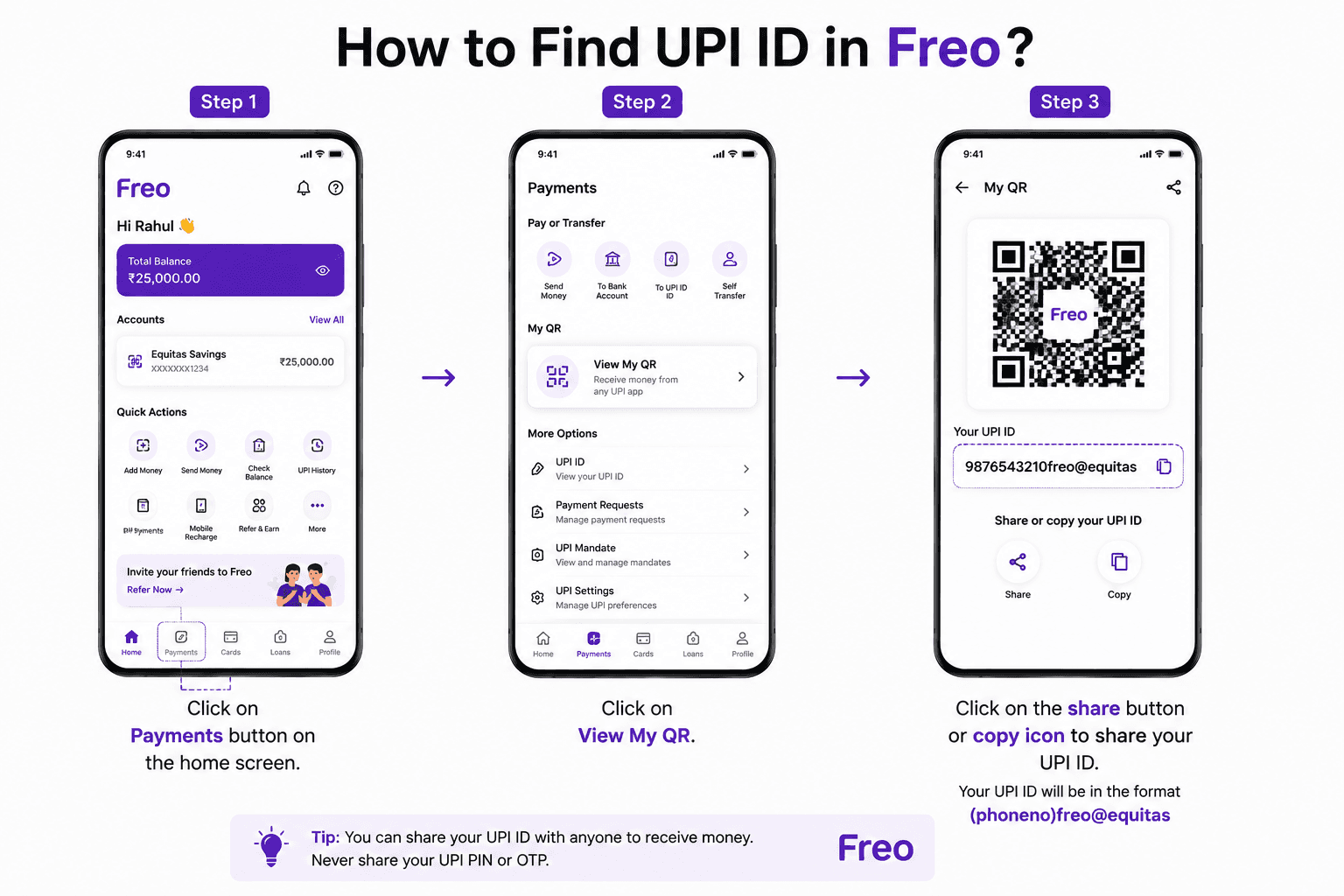
Step 1: Click on payments button on the home screen
Step 2: Click on view my QR
Step 3: Click on the share button or copy icon to share your UPI ID. Your UPI ID will be in the format "(phoneno)freo@equitas"
How to Find UPI ID in WhatsApp Payment?
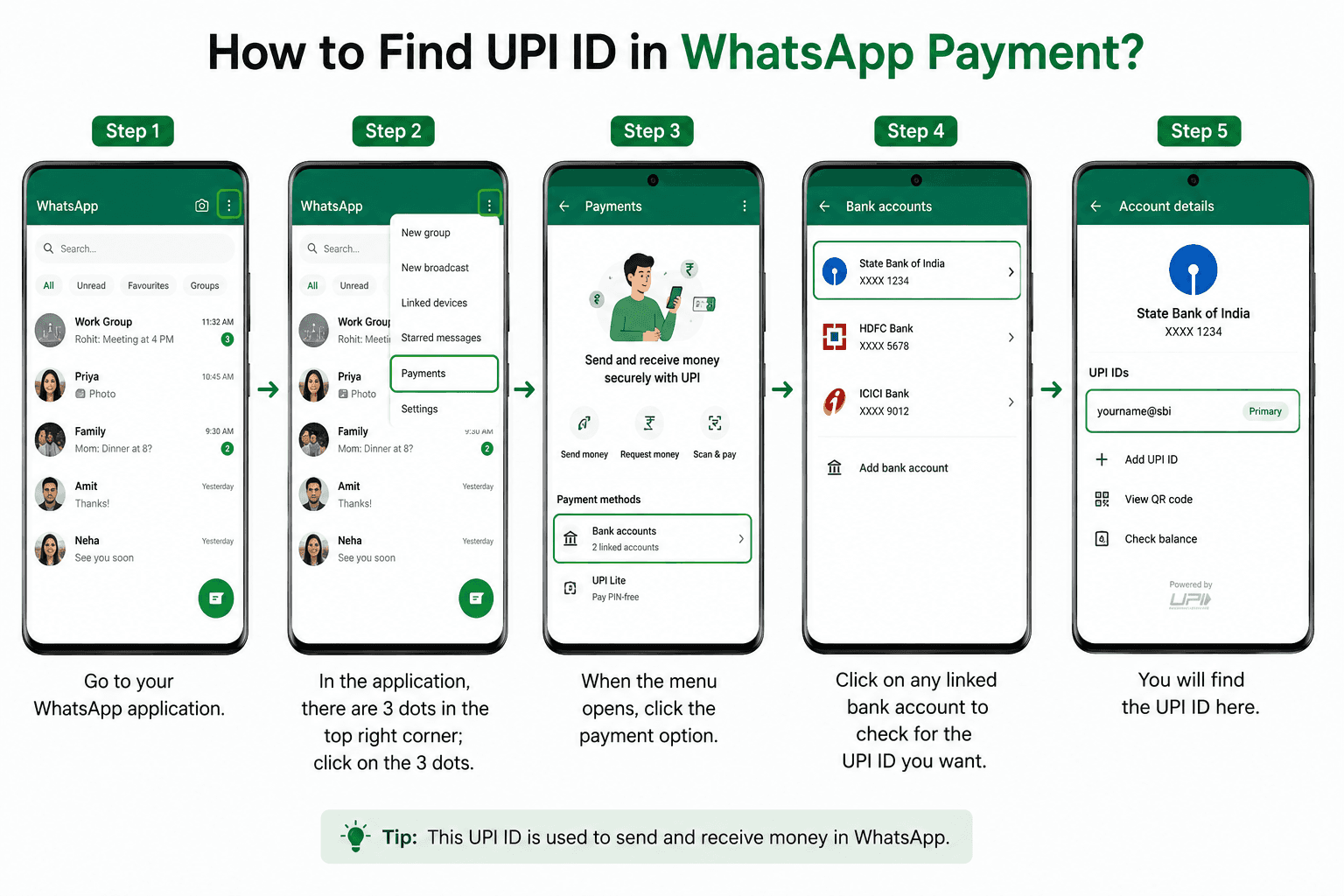
You search for how to find a UPI ID in WhatsApp. Payment ends here, and it is a very easy process. All you need to do is:
Step 1: Go to your WhatsApp application.
Step 2: In the application, there are 3 dots in the top right corner; click on the 3 dots.
Step 3: When the menu opens, click the payment option.
Step 4: Click on any linked bank account to check for the UPI ID you want.
Step 5: You will find the UPI ID here.
How to Find UPI ID in Google Pay?
You just need to follow these simple steps to find your UPI ID in Google Pay:
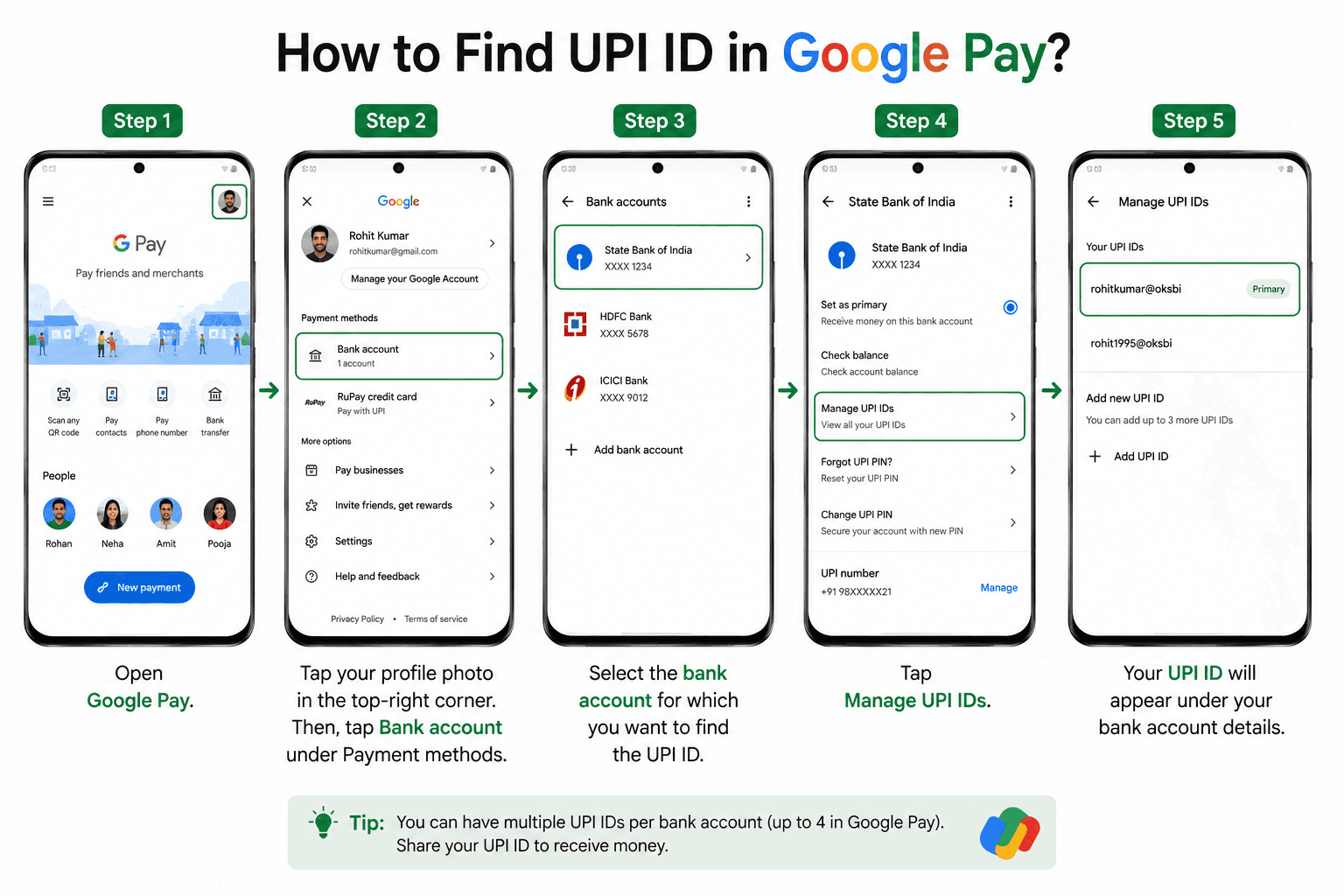
Open Google Pay.
Tap your profile photo in the top-right corner.
Tap Bank account under Payment methods.
Select the bank account for which you want to find the UPI ID.
Tap Manage UPI IDs.
Your UPI ID will appear under your bank account details.
For example, your UPI ID may look like abc@oksbi. The handle can vary depending on the payment service provider bank associated with your Google Pay account.
Tip: If you have more than one bank account linked to Google Pay, select the relevant account first. Each bank account can have its own UPI ID(s). Google Pay currently allows up to four UPI IDs per bank account.
How to Find Your UPI ID on PhonePe
You can usually find your UPI ID from your PhonePe profile and linked bank account settings.
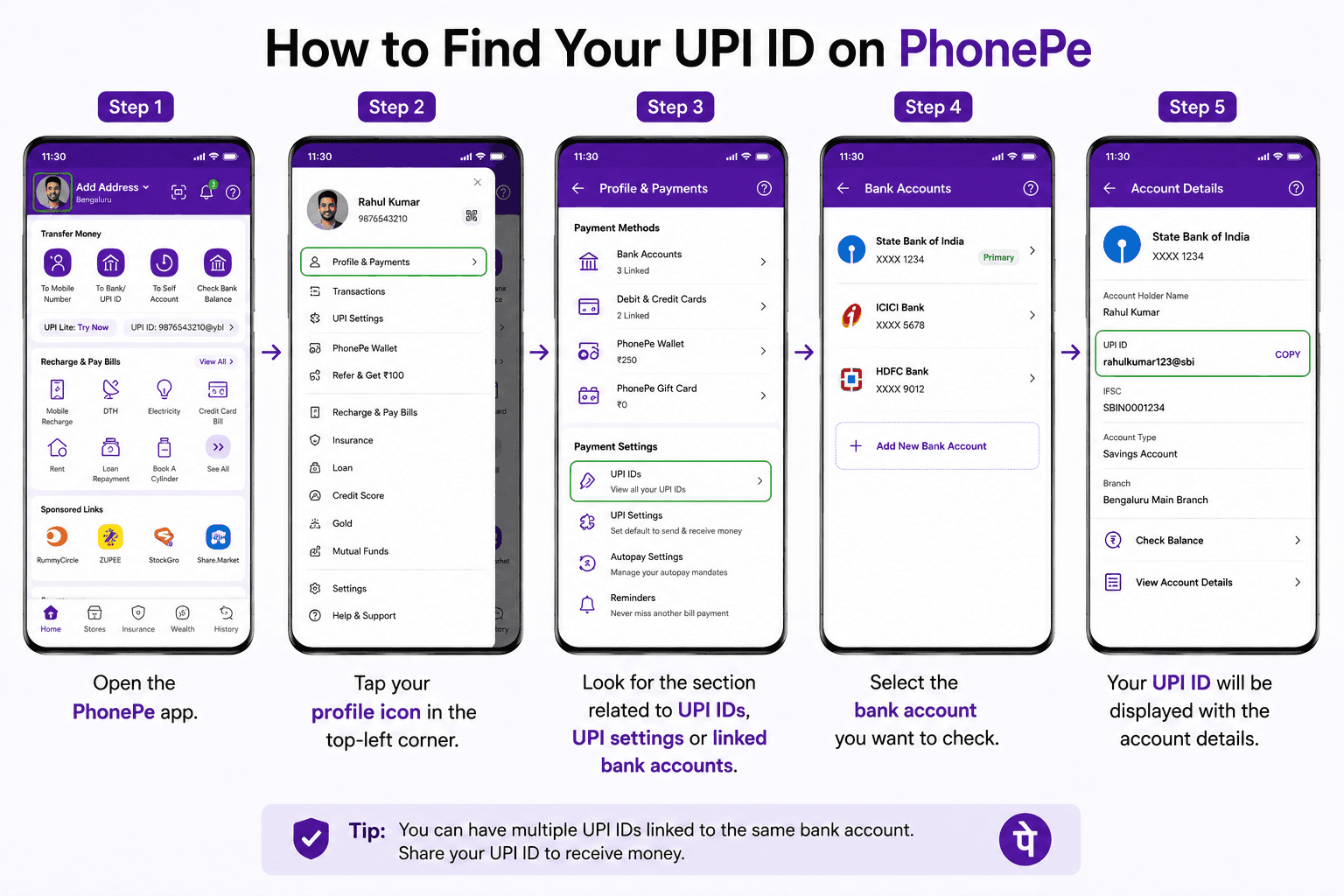
Steps:
Open the PhonePe app.
Tap your profile icon in the top-left corner.
Look for the section related to UPI IDs, UPI settings or linked bank accounts.
Select the bank account you want to check.
Your UPI ID will be displayed with the account details.
Your PhonePe UPI ID may use a handle such as @ybl. The exact UPI ID can vary based on the account and UPI configuration.
How to Find Your UPI ID on BHIM
You can view your UPI ID from your BHIM profile.
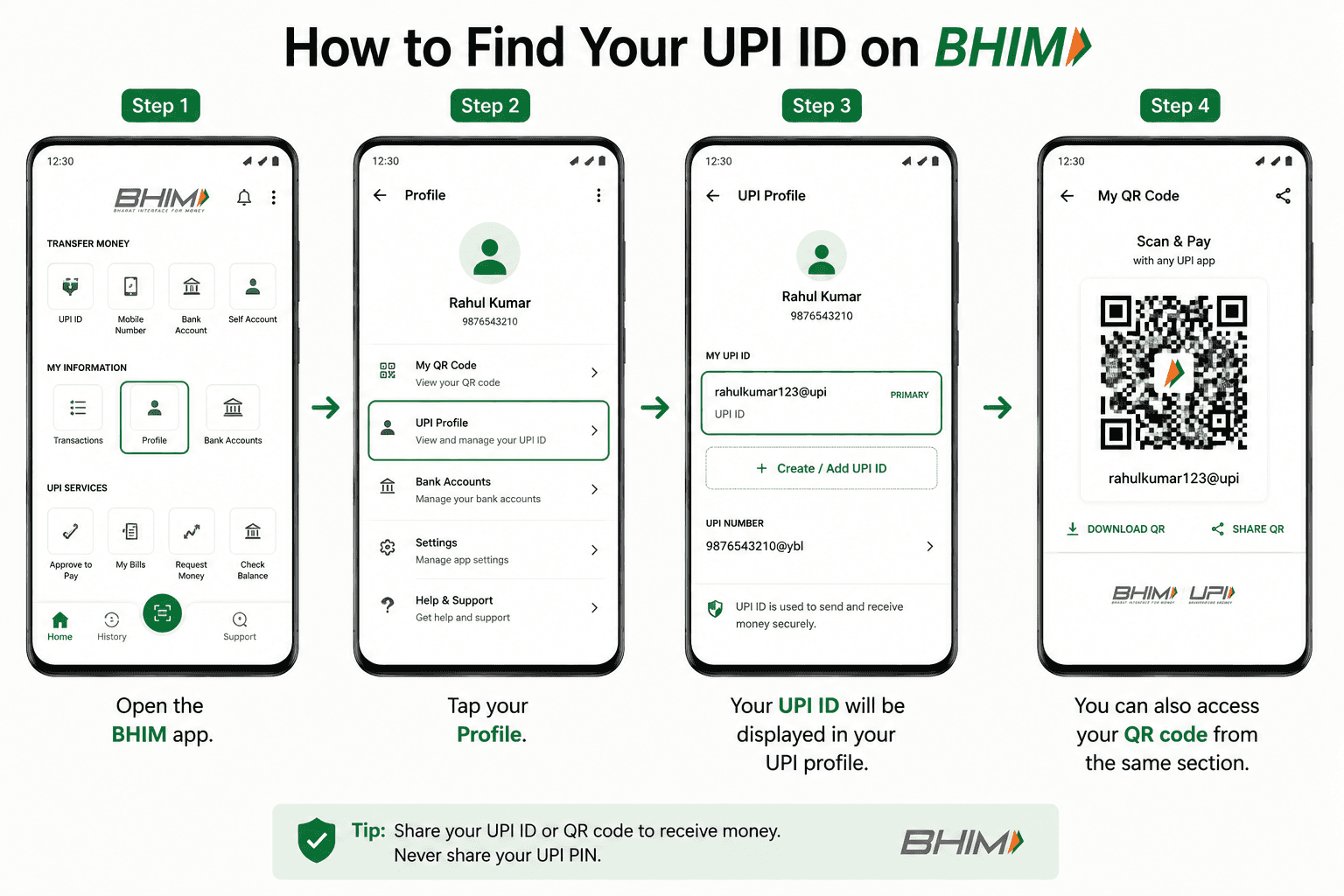
Steps:
Open the BHIM app.
Tap your Profile.
Your UPI ID will be displayed in your UPI profile.
You can also access your QR code from the same section.
BHIM also allows users to manage their UPI profile and switch between UPI IDs.This id can look like: registeredmobilenumber@upi.
How to Find Your UPI ID on Paytm
You can find your primary UPI ID directly from your Paytm profile.
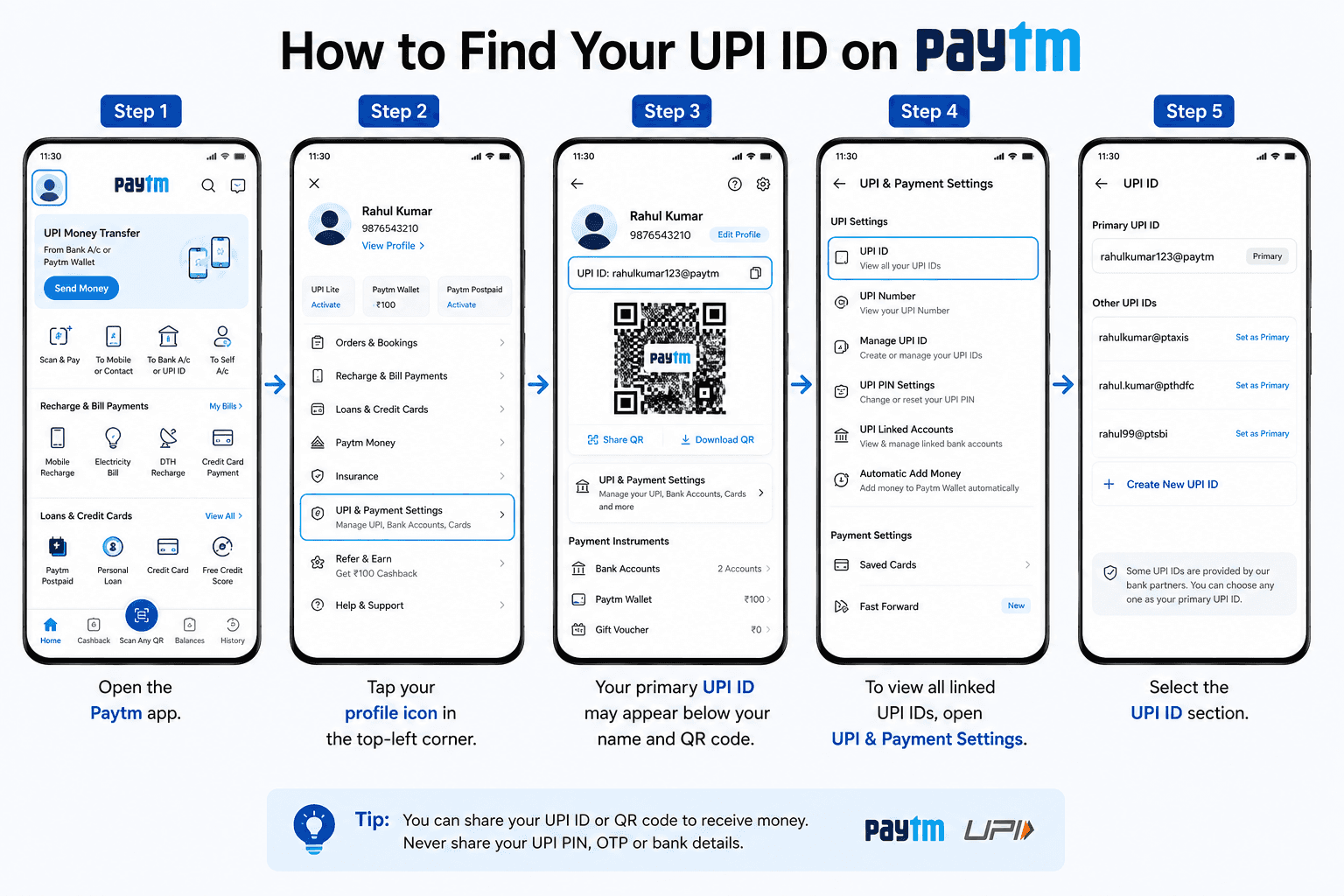
Steps:
Open the Paytm app.
Tap your profile icon in the top-left corner.
Your primary UPI ID may appear below your name and QR code.
To view all linked UPI IDs, open UPI & Payment Settings.
Select the UPI ID section.
Paytm UPI IDs can use handles such as @paytm or partner-bank handles such as @ptaxis, @pthdfc, @ptsbi or @ptyes, depending on the account setup.
How to Find UPI ID in Amazon Pay?
Finding your UPI ID in Amazon Pay is also very easy, following are the steps to do so:

Step 1: Open the Amazon Pay app.
Step 2: Swipe left to open the menu.
Step 3: Go to the Amazon Pay section.
Step 4: Click on Amazon Pay UPI.
Your Amazon Pay UPI ID will look like this: 123456789@apl.
How to Send Money Using UPI ID?
Sending money through UPI ID is a quick and easy process. The first thing you will need is the UPI ID of the receiver. So it is wise to ask them in advance before sending money to them to ensure smooth and hassle-free payment. Once you have the receiver's UPI ID, all you need to do is select the 'Pay UPI ID' option and enter their UPI ID.
Open your UPI app.
Choose the option to pay/send money using UPI ID.
Enter the recipient's UPI ID.
Verify the recipient's name.
Enter the amount and complete the payment with your UPI PIN.
UPI ID vs UPI PIN: What's the Difference?
UPI ID | UPI PIN |
|---|---|
Identifies your UPI account/payment address | Authorises a UPI transaction |
Used to send or receive money | Entered to approve a payment |
Can be shared when receiving payments | Must never be shared |
Looks like | Usually a 4- or 6-digit PIN |
Simplify your financial life with Freo UPI.
Download the app today and enjoy instant payments, bill payments, and more.
Frequently Asked Questions
How to find a UPI ID from a phone number?
Not necessarily. A phone number can help you find a person in some UPI apps, but it does not reveal their UPI ID in every case. If you need someone's UPI ID, the safest option is to ask them to share their UPI ID or QR code.
Can I create different UPI IDs on different apps?
Yes, it is possible to create different UPI IDs on different UPI apps. But your transaction details will be registered to the app you have used for that transaction, meaning you cannot view payments made via PhonePe on Google Pay, nor can you check details of money you have received on WhatsApp money on Amazon Pay.
Can we link multiple UPI IDs to the same bank account?
Yes, you can link multiple UPI IDs to the same bank account. However, the UPI PIN will remain the same for all UPI IDs linked to the bank account.
Can you know the UPI ID of a user using the phone number?
No, it is not possible to check any user's UPI ID using the phone number. At present, you can know the name of the receiver or merchant.
What does a UPI ID look like?
A UPI ID usually looks like:
name@oksbi
mobilenumber@paytm
username@ybl
Is It Safe to Share Your UPI ID?
Yes. You can share your UPI ID when someone needs to send you money. However, never share your UPI PIN, OTP or debit-card details. A UPI PIN is used to authorise transactions, while a UPI ID is used to identify your payment address.
Do I Need to Share My UPI ID to Receive Money?
No. You can also receive money through a UPI QR code or, where supported, a UPI-linked phone number. If someone specifically asks for your UPI ID, you can copy and share it from your UPI app.
Can I have multiple UPI Id's?
Yes. You can have multiple UPI IDs, depending on the UPI app and bank account. For example, Google Pay currently allows up to four UPI IDs for a bank account.
Naina Rajgopalan
Naina Rajgopalan has a thing for numbers and a deep fascination to learn about all things finance. She's been money-wise from a young age and has always shared her knowledge and tips with those around her. Being a part of the content team at Freo, a neobank that offers flexible and customised financial products, along with benefits such as insurance on balance, safe & secure banking, and so on, Naina stays updated with the latest of what happens in the banking and fintech industries. She has taken upon herself to share her knowledge with readers across all walks of life to help them manage their finances and budgets better, so they can make better decisions while spending, borrowing, investing and saving.