



UPI


Need to change your UPI PIN? You can usually change it from the bank account or UPI settings in your payment app. The exact steps vary by app and bank. This guide explains how to change or reset your UPI PIN on Google Pay, PhonePe, BHIM and other UPI apps.
What is a UPI PIN?
A UPI PIN is a 4- or 6-digit code used to authorise transactions from your linked bank account. You enter it when approving a UPI payment. Your UPI PIN is different from your UPI ID and should never be shared with anyone.
Not sure how UPI, UPI IDs and UPI PINs work together? Read our guide to What Is UPI?
How Do I Change My UPI PIN?
Open your UPI app → select your bank account → choose "Change UPI PIN" → enter your existing PIN → create and confirm your new PIN.
How to Change UPI PIN
The steps vary slightly between UPI apps, but the process is generally:
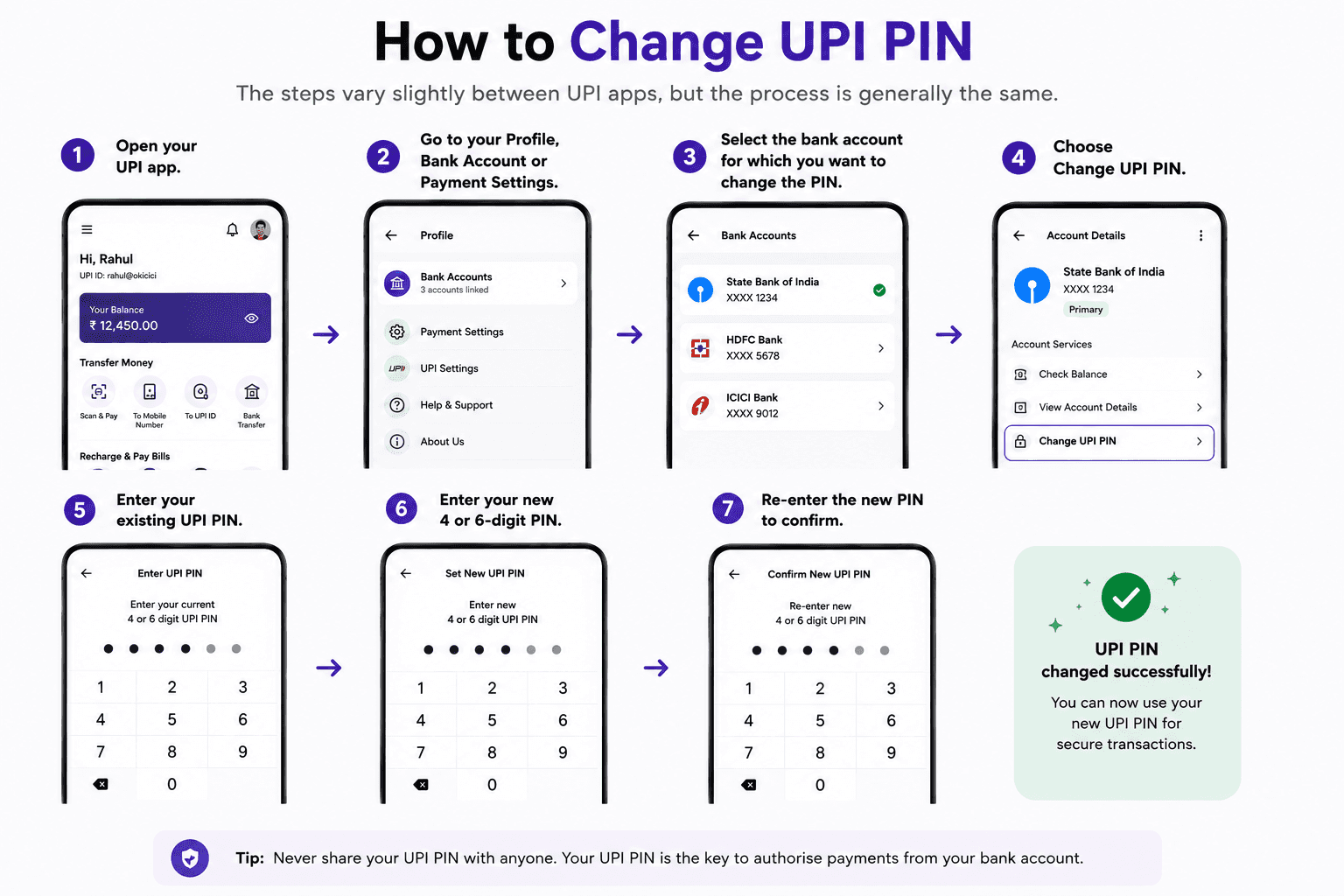
Open your UPI app.
Go to your Profile, Bank Account or Payment Settings.
Select the bank account for which you want to change the PIN.
Choose Change UPI PIN.
Enter your existing UPI PIN.
Enter your new 4- or 6-digit PIN.
Re-enter the new PIN to confirm.
Note: If you've forgotten your current UPI PIN, don't use the change-PIN process. Use the app's Forgot UPI PIN or Reset UPI PIN option instead.
How to Change UPI PIN on Google Pay
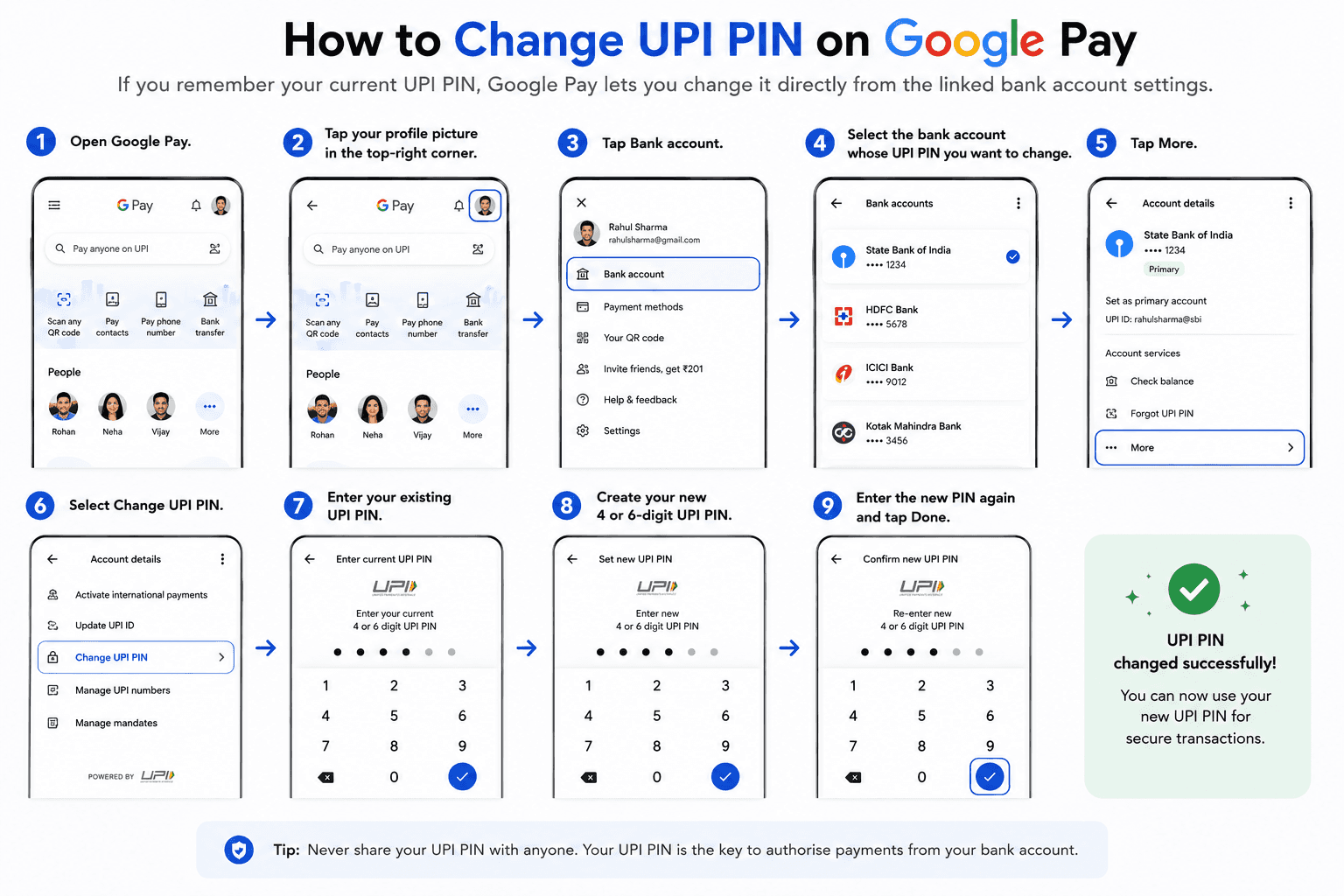
If you remember your current UPI PIN, Google Pay lets you change it directly from the linked bank account settings.
Steps:
Open Google Pay.
Tap your profile picture in the top-right corner.
Tap Bank account.
Select the bank account whose UPI PIN you want to change.
Tap More.
Select Change UPI PIN.
Enter your existing UPI PIN.
Create your new UPI PIN.
Enter the new PIN again and tap Done.
How to Reset UPI PIN on Google Pay
Forgot your UPI PIN? Use the reset option instead of "Change UPI PIN."
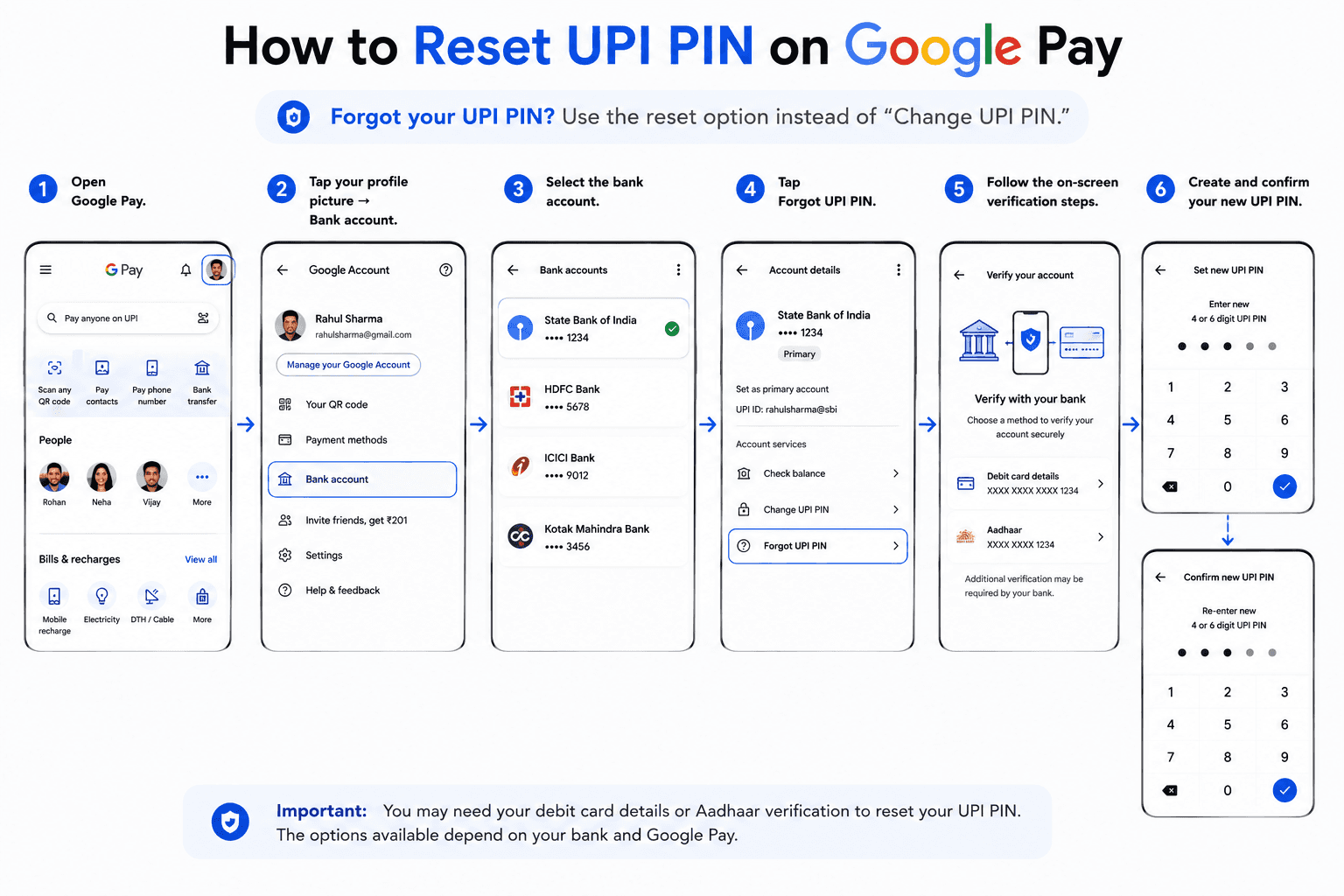
Open Google Pay.
Tap your profile picture → Bank account.
Select the bank account.
Tap Forgot UPI PIN.
Follow the on-screen verification steps.
Create and confirm your new UPI PIN.
Google currently states that you need your debit card or Aadhaar card details, depending on the available verification method.
How to Change UPI PIN on PhonePe
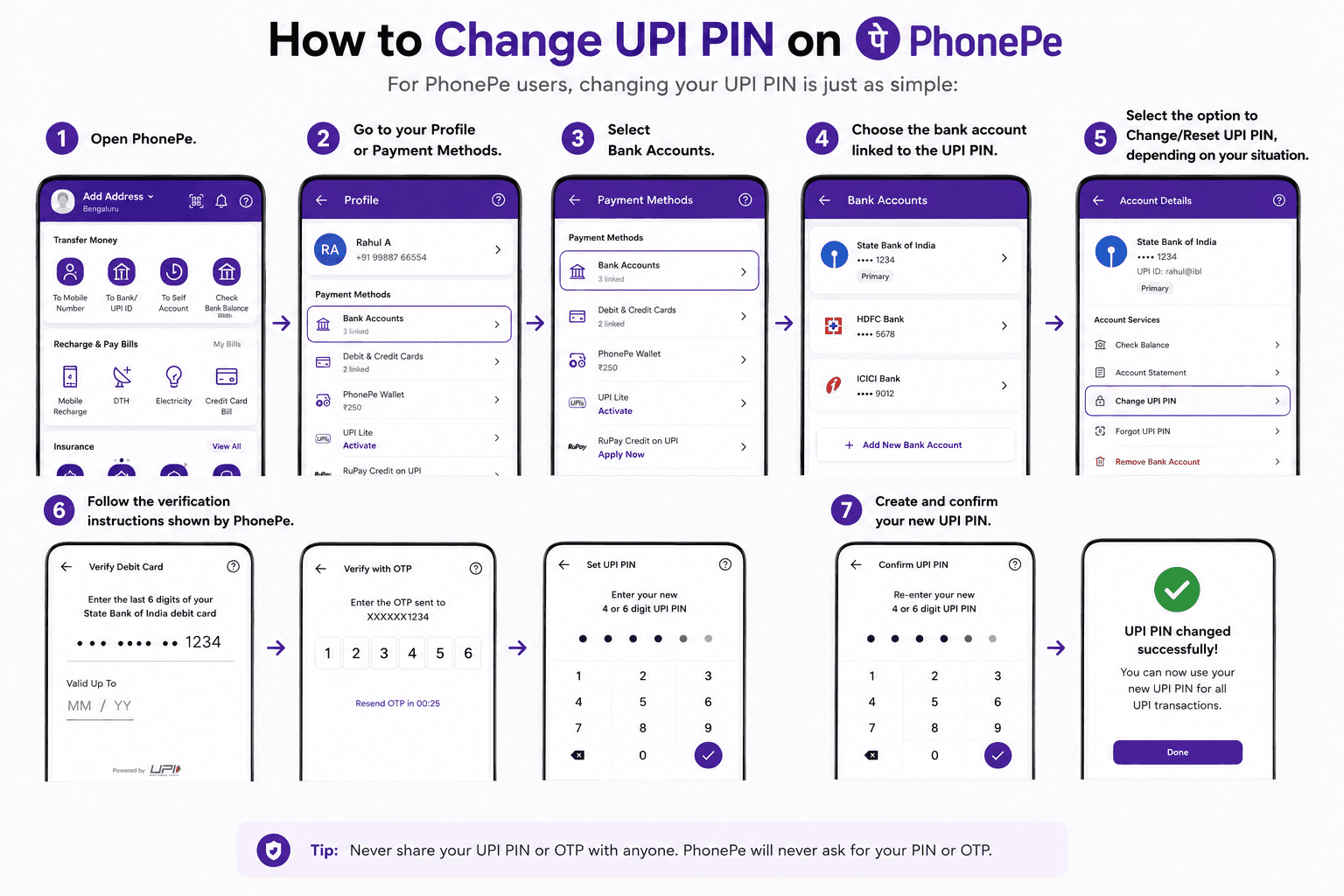
For PhonePe users, changing your UPI PIN is just as simple:
Open PhonePe.
Go to your Profile or Payment Methods.
Select Bank Accounts.
Choose the bank account linked to the UPI PIN.
Select the option to Change/Reset UPI PIN, depending on your situation.
Follow the verification instructions shown by PhonePe.
Create and confirm your new UPI PIN.
Do not hard-code debit-card requirements here unless the current PhonePe flow confirms them.
How to Reset UPI PIN in PhonePe
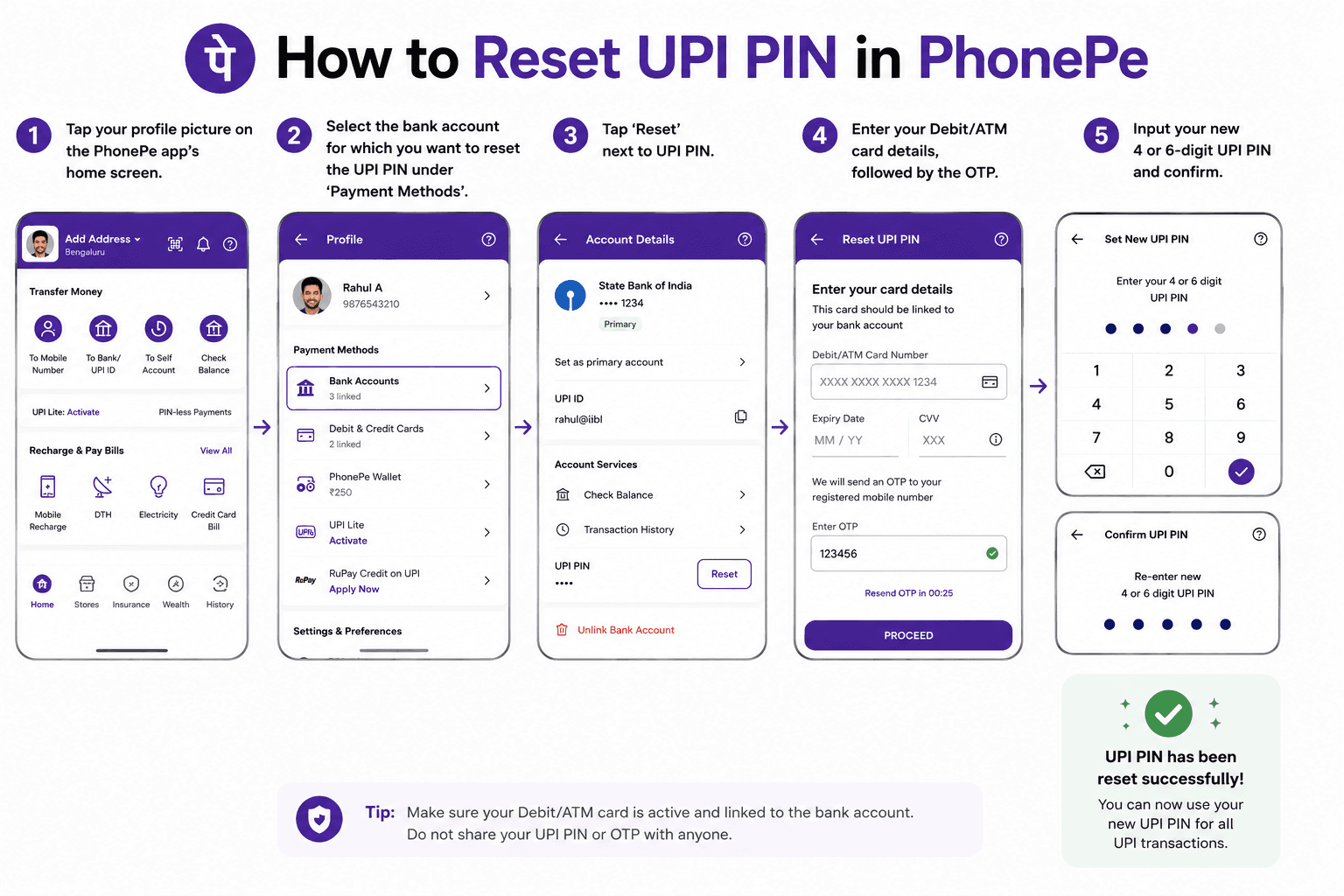
Tap your profile picture on the PhonePe app's home screen.
Select the bank account for which you want to reset the UPI PIN under ‘Payment Methods’.
Tap ‘Reset’ next to UPI PIN.
Enter your Debit/ATM card details, followed by the OTP.
Input your new 4 or 6-digit UPI PIN and confirm.
How to Change or Reset UPI PIN on BHIM
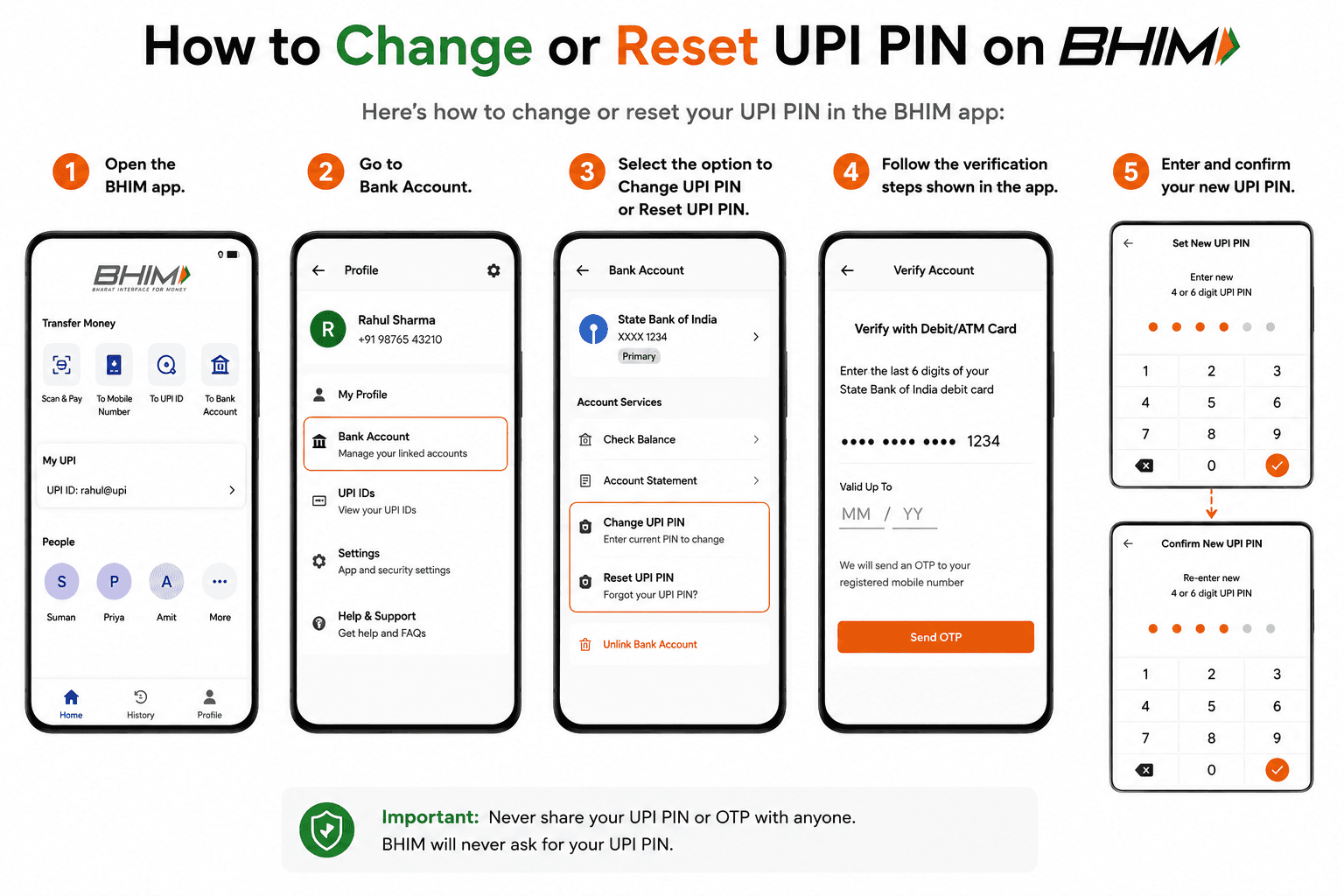
Here’s how to change your UPI PIN in the BHIM app:
Open the BHIM app.
Go to Bank Account.
Select the option to Change UPI PIN or Reset UPI PIN.
Follow the verification steps shown in the app.
Enter and confirm your new UPI PIN.
For the reset flow, BHIM's official guidelines show debit-card details and OTP verification as part of the process.
How to Change UPI PIN Without Debit Card
If you don’t have a debit card, you can still reset your UPI PIN using Aadhaar-based authentication in some apps:
Go to the payment methods section of your UPI app.
Select UPI and choose Aadhaar-based authentication.
Verify your identity using OTPs from your bank and UIDAI.
Reset your UPI PIN and confirm it.
Change UPI PIN vs Reset UPI PIN
Change UPI PIN | Reset UPI PIN |
|---|---|
You remember your existing PIN | You forgot your PIN |
Enter your current PIN | Verify your bank account |
Create a new PIN | Create a new PIN |
Usually completed from bank-account settings | Usually uses a "Forgot/Reset UPI PIN" option |
With these easy steps, you can confidently manage your UPI PIN and ensure a secure digital payment experience.
What to Do If You Forgot Your UPI PIN?
If you've forgotten your UPI PIN, don't try to change it using your old PIN. Open your UPI app, select the relevant bank account and choose Forgot UPI PIN or Reset UPI PIN. You'll then need to complete the verification process supported by your bank or app before creating a new PIN.
Your UPI PIN is different from your UPI ID. If you need to locate or copy your UPI ID, see our guide on how to find your UPI ID
Can I Change or Reset UPI PIN Without a Debit Card?
Sometimes. Some banks and UPI apps support Aadhaar-based verification for setting or resetting a UPI PIN. Availability depends on the bank and app. If Aadhaar-based verification isn't available, you may need your debit card details to reset the PIN.
What Happens If I Enter the Wrong UPI PIN?
If you enter an incorrect UPI PIN, the transaction won't be authorised. Multiple incorrect attempts can temporarily block UPI transactions for the linked bank account. For example, Google Pay currently says that three incorrect PIN attempts within 24 hours can result in a 24-hour block, or you can reset the PIN to transact sooner.
UPI PIN Safety Tips
Never share your UPI PIN with anyone.
Don't enter your UPI PIN to receive money.
Don't share OTPs used for account verification.
Before authorising a payment, verify the recipient and amount.
Say Hi to Freo UPI Anytime Anywhere Scan & Pay with UPI Instant Transfer
Naina Rajgopalan
Naina Rajgopalan has a thing for numbers and a deep fascination to learn about all things finance. She's been money-wise from a young age and has always shared her knowledge and tips with those around her. Being a part of the content team at Freo, a neobank that offers flexible and customised financial products, along with benefits such as insurance on balance, safe & secure banking, and so on, Naina stays updated with the latest of what happens in the banking and fintech industries. She has taken upon herself to share her knowledge with readers across all walks of life to help them manage their finances and budgets better, so they can make better decisions while spending, borrowing, investing and saving.