


UPI IDs

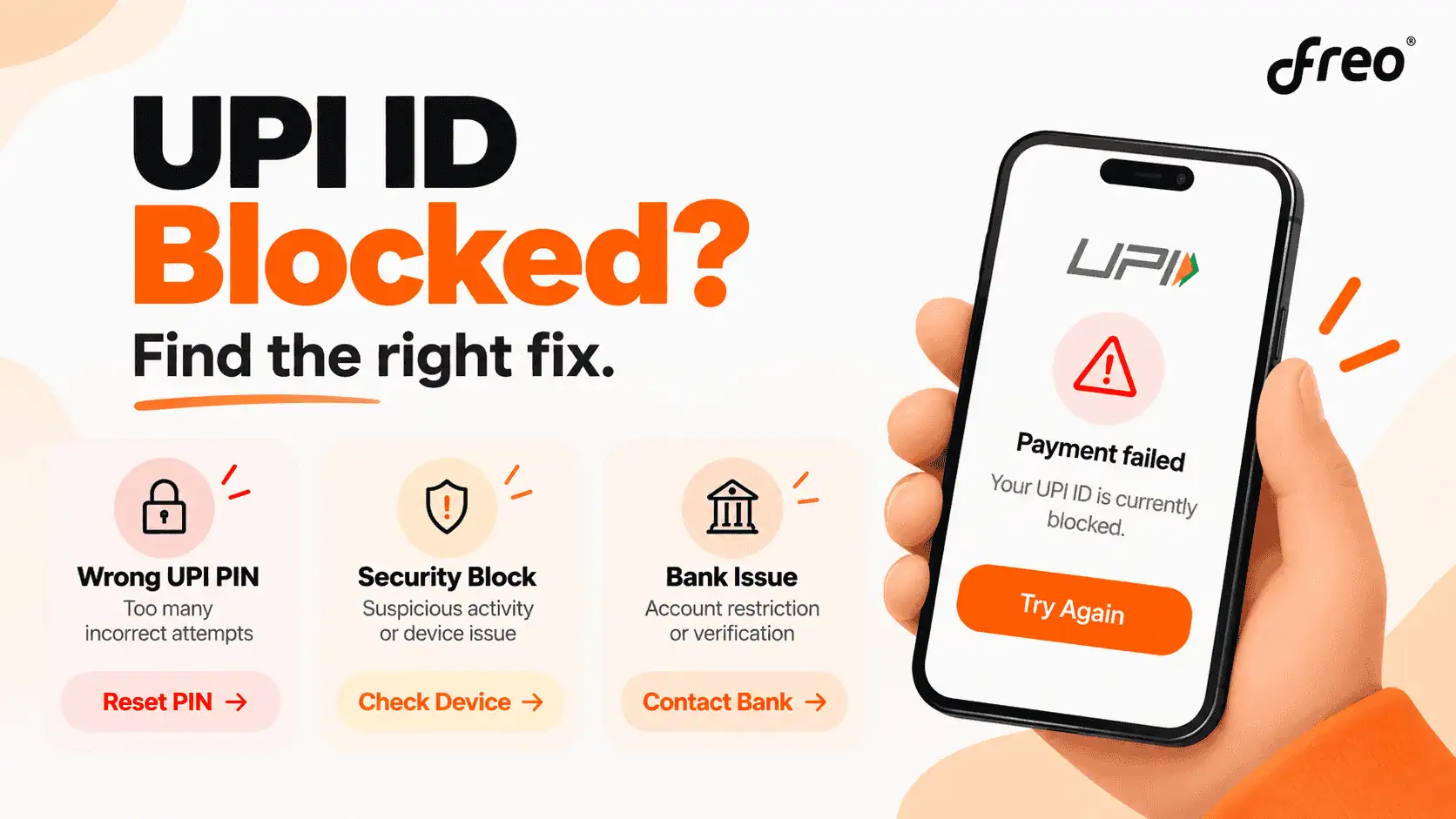
If a UPI payment suddenly stops working, the first thing to check is what has actually been blocked.
A UPI ID, UPI PIN, linked bank account and the UPI app are not the same thing. For example, repeated incorrect UPI PIN attempts can temporarily stop outgoing UPI transactions, while a bank-level restriction may need to be resolved by the bank. A security warning can require a different fix altogether.
So, before trying to unblock anything, check the exact error shown by the UPI app.
UPI ID Blocked or UPI PIN Blocked: What's the Difference?
A UPI ID is the payment address used to identify an account for UPI payments. A UPI PIN is the 4- or 6-digit code used to authorise UPI transactions. NPCI specifically treats them as different parts of the payment process.
This distinction matters because repeated incorrect UPI PIN entries generally result in a temporary restriction on sending money through UPI, rather than permanently disabling the UPI ID itself. NPCI says that multiple incorrect PIN attempts may temporarily block sending money, with the exact behaviour varying by bank.
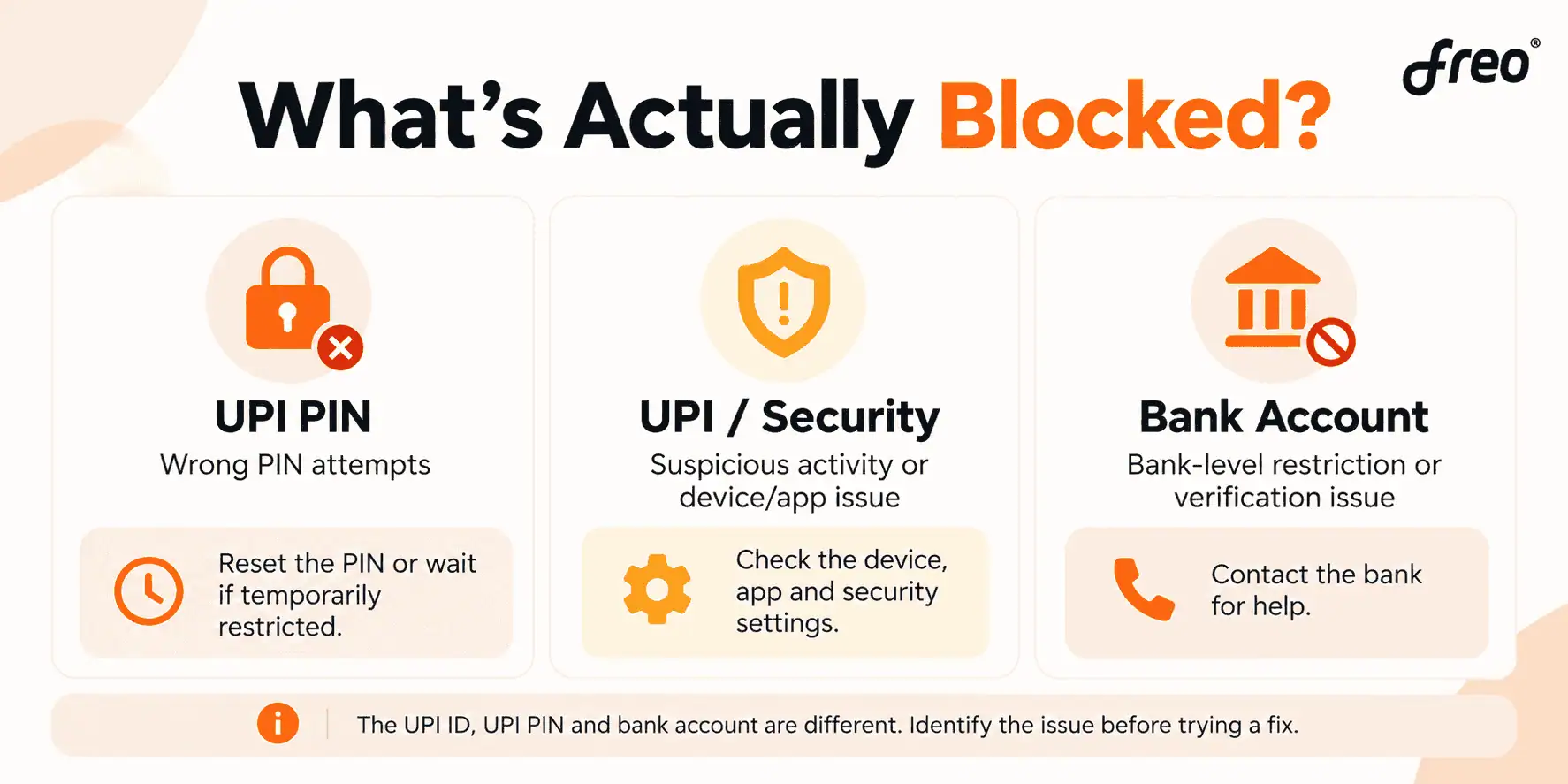
Google Pay, for example, currently states that entering an incorrect UPI PIN more than three times can mean waiting 24 hours before making another transaction or resetting the PIN to transact sooner.
A quick way to tell what the problem is
What the user sees | What it may mean |
|---|---|
Wrong UPI PIN / PIN attempts exceeded | Temporary UPI PIN or transaction lock |
Payments blocked due to suspicious activity | Security restriction |
Bank account cannot be used for UPI | Bank account or verification issue |
UPI app cannot verify the mobile number | SMS, SIM or registration issue |
Only one person cannot send money | Recipient-side or contact-specific issue |
UPI works in one app but not another | App-specific problem |
How to Unblock UPI ID
Once the cause is clear, the next step depends on the type of restriction.
If the UPI PIN is blocked after wrong attempts
If the problem started after entering the wrong UPI PIN several times, there are usually two options:
Wait for the temporary block to expire: Some banks and UPI apps impose a temporary lock after repeated incorrect PIN attempts.
Reset the UPI PIN: If the app offers a Forgot UPI PIN or Reset UPI PIN option, the user can complete the required verification and create a new PIN.
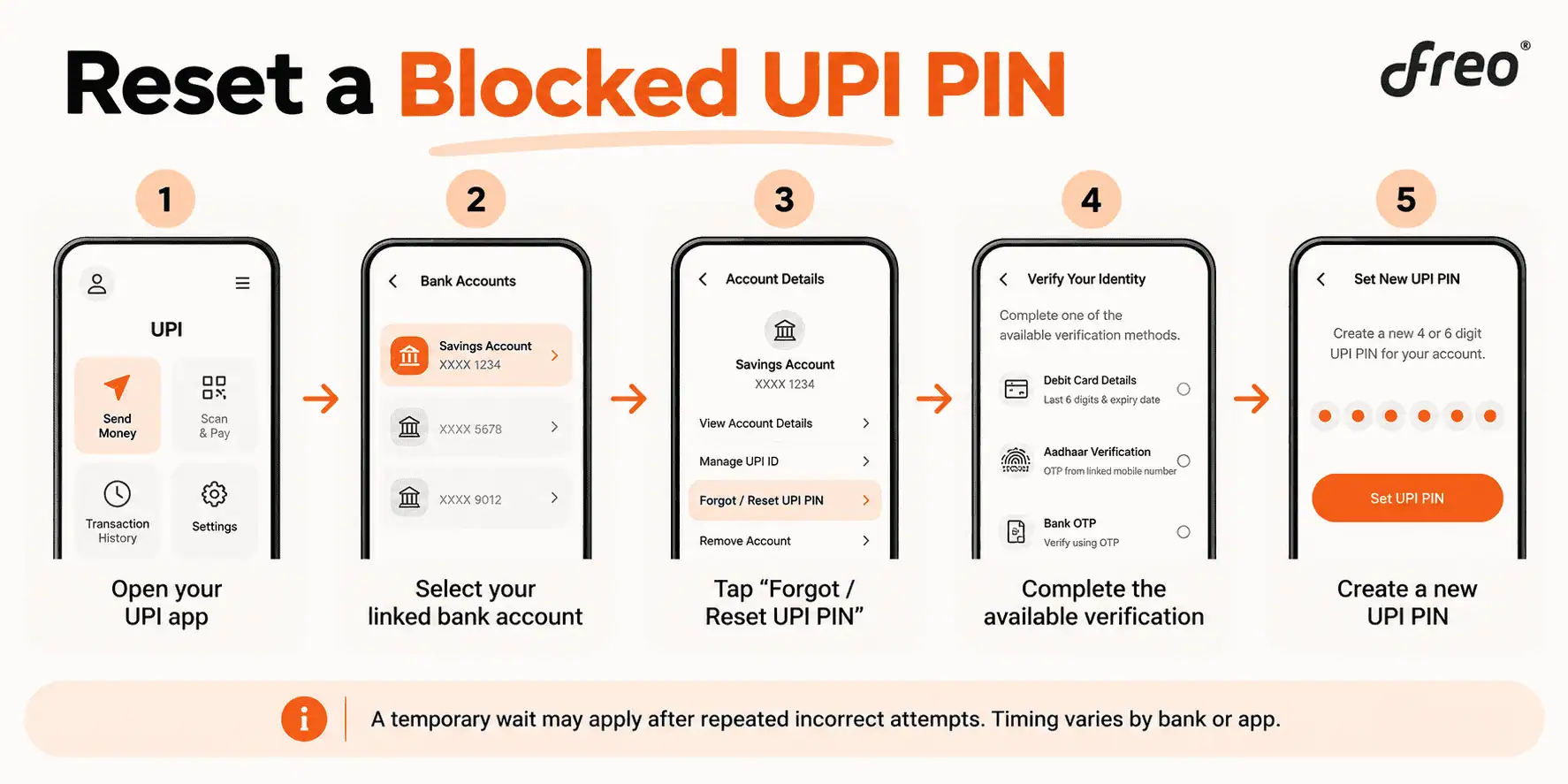
Google Pay currently says that users who enter a wrong UPI PIN more than three times can either wait 24 hours or reset the PIN to make transactions sooner.
The exact process and timing can vary between banks and apps, so the message shown in the app should take priority.
For a detailed guide, see Freo's how to change or reset a UPI PIN
What If the UPI ID Is Not Working Because of the Bank Account?
Sometimes the UPI ID is not the actual problem.
A linked bank account may have a restriction, verification issue or temporary service problem. In such cases, resetting the UPI PIN may not solve the issue. Check whether:
the correct bank account is linked;
the mobile number registered with the bank is still active;
SMS verification is working;
the bank account is operating normally;
the bank has placed any restriction on UPI services.
If the bank account itself is restricted, the bank will need to resolve it.
What If UPI Is Not Working After Changing the SIM or Phone?
Changing a SIM, handset or UPI app can require the user to register again.
NPCI says that after changing the SIM, mobile or PSP application, the customer needs to re-register for UPI.
If the problem started after changing phones or SIM cards:
use the mobile number registered with the bank;
make sure the correct SIM is being used for SMS verification;
check that outgoing SMS is working;
complete the UPI app's registration process again;
follow any security verification shown by the app.
Google Pay also advises users with dual-SIM phones to ensure that SMS is sent from the number linked to the bank account.
What If UPI Is Still Not Working After Resetting the PIN?
If the new UPI PIN works but payments are still failing, the problem is probably not the PIN. Try these checks:
Check whether the problem affects one app or every UPI app. If only one app is affected, check that app's support section.
Check the bank account. The bank may have placed a restriction or there may be a temporary service issue.
Check mobile verification. UPI registration depends on the mobile number linked to the bank account.
Check for a security warning. If the app mentions suspicious activity, follow its security instructions rather than repeatedly retrying the payment.
Contact the bank or UPI app. If the issue continues after the basic checks, support can determine whether the restriction is at the app, bank or account level.
Blocked, Deactivated or Deleted UPI ID: Which One Is It?
These terms are easy to mix up, but they describe different situations.
Blocked: Access or transactions have been temporarily restricted. The underlying UPI setup may still exist and the restriction may be reversible.
Deactivated: The UPI ID or UPI service has been intentionally turned off.
Deleted: The UPI ID has been removed and may need to be created again if the user wants another one.
If the intention is to stop using a UPI ID rather than restore it, Freo has separate guides on how to deactivate a UPI ID and how to delete a UPI ID.
This distinction also prevents a common mistake: trying to “unblock” an ID that the user actually wanted to deactivate or delete.
Closing Thoughts
A blocked UPI ID does not always mean the UPI ID itself has been disabled.
The first step is to identify whether the problem is a blocked UPI PIN, a bank-account restriction, a security block, a registration issue or a problem with the app. Once the cause is clear, the right fix is usually much easier to find.
If a PIN has been blocked after repeated incorrect attempts, check whether the app allows a PIN reset or whether a temporary waiting period applies. If the message points to suspicious activity or a bank-level restriction, follow the bank or app's official recovery process instead of repeatedly trying payments.
FAQs About Unblocking UPI ID
How long does a UPI block last?
There is no single duration for every type of UPI block. A temporary restriction caused by incorrect PIN attempts may last for a specified period, while a bank-level or security-related restriction can require additional action.
For Example: Google Pay currently says that more than three incorrect UPI PIN attempts can result in a 24-hour wait, or the user can reset the PIN to transact sooner.
Can I unblock my UPI ID immediately?
It depends on the reason for the restriction. If the problem is a forgotten or blocked UPI PIN and the app provides a reset option, resetting the PIN may allow transactions to resume sooner. A bank-level or security-related block may require the bank or app to review the issue.
How do I unblock UPI in Google Pay?
If the problem is a forgotten UPI PIN, open Google Pay, go to Profile → Bank account, select the affected account and choose Forgot UPI PIN. Follow the verification instructions shown on screen. Google Pay currently supports debit-card or Aadhaar-based verification where the bank allows it.
How do I unblock my UPI ID in PhonePe?
If the issue is related to the UPI PIN, PhonePe's current process is to open My Money → Payment Methods → Bank Accounts, select the bank account and choose Reset next to the UPI PIN. The app then asks for the required verification details and OTP.
How do I unblock UPI in SBI?
First identify whether the issue is a PIN problem or an SBI account-level UPI restriction. SBI provides dedicated customer-care options for UPI services, including UPI blocking and support. If the account itself has been restricted, the bank will need to resolve it rather than the UPI app alone.
Can I unblock UPI without a debit card?
Yes, in some cases. Aadhaar-based verification is supported by some banks and UPI apps, and NPCI has introduced UIDAI face authentication as an additional option for UPI PIN set/reset. Availability depends on the bank and app.
For a detailed explanation, see Freo's guide on using UPI without a debit card.
Can I receive money if my UPI PIN is blocked?
A temporary restriction on outgoing UPI transactions does not necessarily mean that every UPI function associated with the account has been disabled. However, the exact behaviour can vary by bank and type of restriction. If the app says that UPI services have been fully disabled, check with the bank before assuming that incoming payments will continue.
Why is my UPI ID not working even though my PIN is correct?
A correct PIN does not rule out other problems. The bank account could be restricted, the mobile number may not be verified correctly, the app may need re-registration, or the bank or UPI service could be experiencing a temporary issue.
What does “UPI ID is invalid” mean?
It usually means the UPI ID entered for the payment could not be recognised or is not currently available for the transaction. Check the spelling of the UPI ID and ask the recipient to confirm the correct ID. If the recipient's UPI ID is correct but the problem continues, the recipient may need to check their UPI app or bank account.
What if the receiver has blocked my UPI ID?
If the recipient has blocked or restricted contact from your UPI ID within their payment app, the solution may need to come from the recipient's side. For example, Google Pay allows users to block and unblock people who send requests.
This is different from your bank blocking your UPI services.
Does changing my phone block my UPI ID?
Changing the phone does not necessarily mean the UPI ID is permanently blocked. However, the user may need to re-register the UPI account on the new device and complete mobile verification. NPCI says users need to re-register after changing their SIM, mobile or PSP app.
Can customer support tell me my UPI PIN?
No. The UPI PIN is a secret authentication credential. NPCI says users should not share their UPI PIN and that bank customer support will not ask for it.
Naina Rajgopalan
Naina Rajgopalan has a thing for numbers and a deep fascination to learn about all things finance. She's been money-wise from a young age and has always shared her knowledge and tips with those around her. Being a part of the content team at Freo, a neobank that offers flexible and customised financial products, along with benefits such as insurance on balance, safe & secure banking, and so on, Naina stays updated with the latest of what happens in the banking and fintech industries. She has taken upon herself to share her knowledge with readers across all walks of life to help them manage their finances and budgets better, so they can make better decisions while spending, borrowing, investing and saving.